Anatomy Of A Theme
In this lesson, you’ll learn about the different files that make up a theme and how they work together to display your WordPress website.
Objectives
After completing this lesson, participants will be able to:
- Recognize that many files are needed to make a theme.
- Identify the basic blocks are used in a WordPress theme.
- Identify the files required to make a WordPress theme.
Prerequisite Skills
You will get the most from this lesson if you have familiarity with:
- Basic knowledge of installing and activating WordPress themes.
- Basic knowledge of HTML, CSS, and PHP.
Readiness Questions
- Are you familiar with installing and activating themes via the WordPress Dashboard?
- Are you familiar with the relationship between HTML, CSS, and JavaScript?
Materials Needed
- Twenty Twenty theme.
- A text editor to view PHP, HTML, CSS, and other files.
- Slides (included in this repo).
Notes for the Instructor
- While there may be “wrong” ways to put together a theme, there is no one “right” way. These examples are very simplistic and are not meant to serve as comprehensive guides. There are other, completely valid ways of structuring themes.
- The Twenty Thirteen theme is used because it has a simple file structure.
Have You Thought About…?
- It’s best to have locally installed WordPress sites, as FTP access can potentially be slow and troublesome.
- Do you want to use a second theme to compare folder/file structures?
Lesson Overview
- Show the basic building blocks of a WordPress theme, and how those relate to PHP files.
- Show the files within a WordPress theme that are used to make the theme.
- Practice exercise to have participants design or pseudo-code a theme.
- Exercise to have participants examine all the folder and files in a theme (their favorite theme?)
Exercises
- Use pseudo-code (an informal high-level description) to outline the files needed to implement the basic structure of a WordPress page that would include a sidebar on the right.
- Install the Twenty Twenty theme or another WordPress theme and examine its files and folder structure.
Assessment
Which files make up the structure of a basic WordPress page?
- header.php, sidebar.php, index.php, footer.php
- header.php, sidebar.php, function.php, footer.php
- homepage.php, header.php, index.php, footer.php
Answer: 1. header.php, sidebar.php, index.php, footer.php
Which files are required for a WordPress theme?
- blog.php, page.php, and style.css
- index.php and style.css
- header.php and footer.php
Answer: 2. index.php and style.css
Additional Resources
Example Lesson
How a WordPress Page is Constructed
WordPress is built to be flexible, and it builds the pages you see on the screen in blocks. A very common arrangement of these blocks includes the header.php, sidebar.php, index.php, and footer.php files, and looks like this:
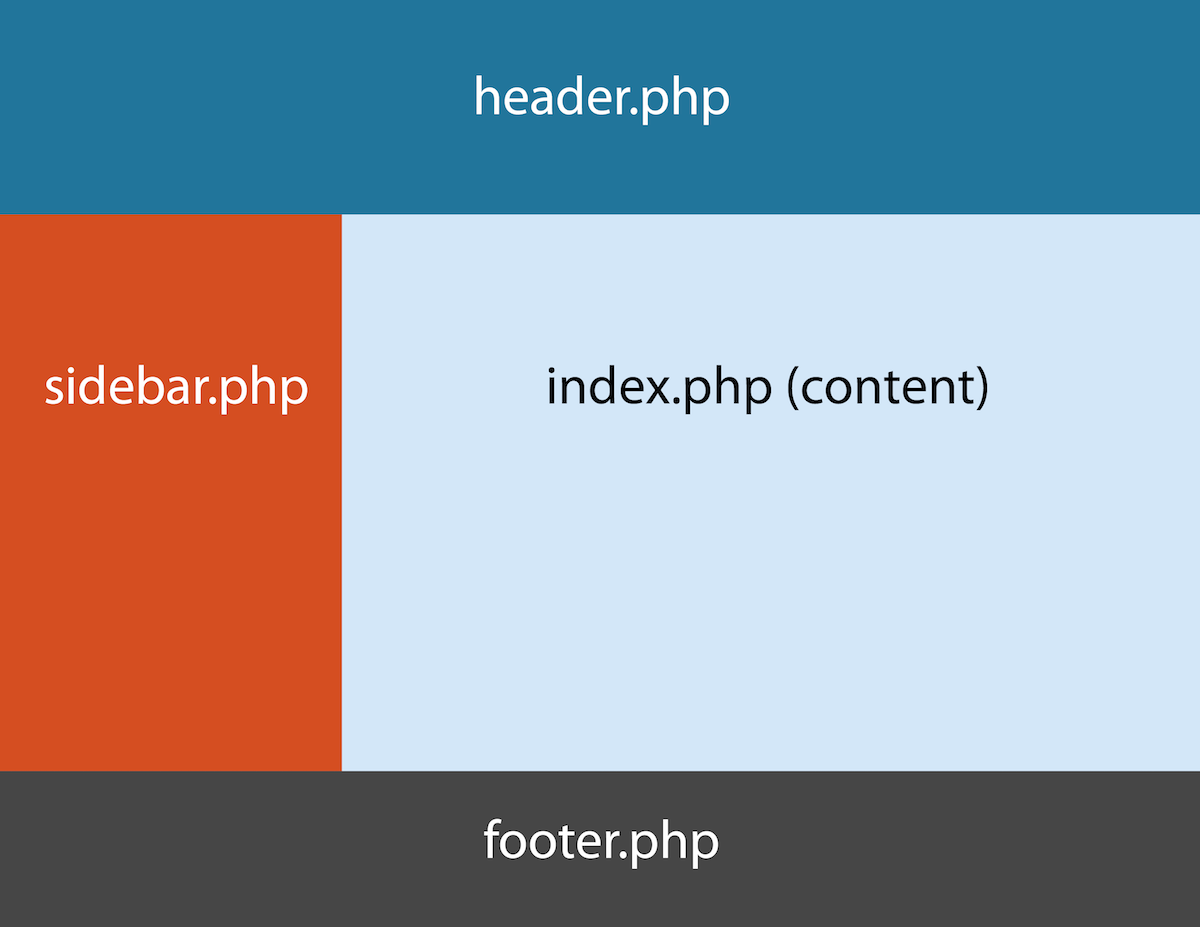
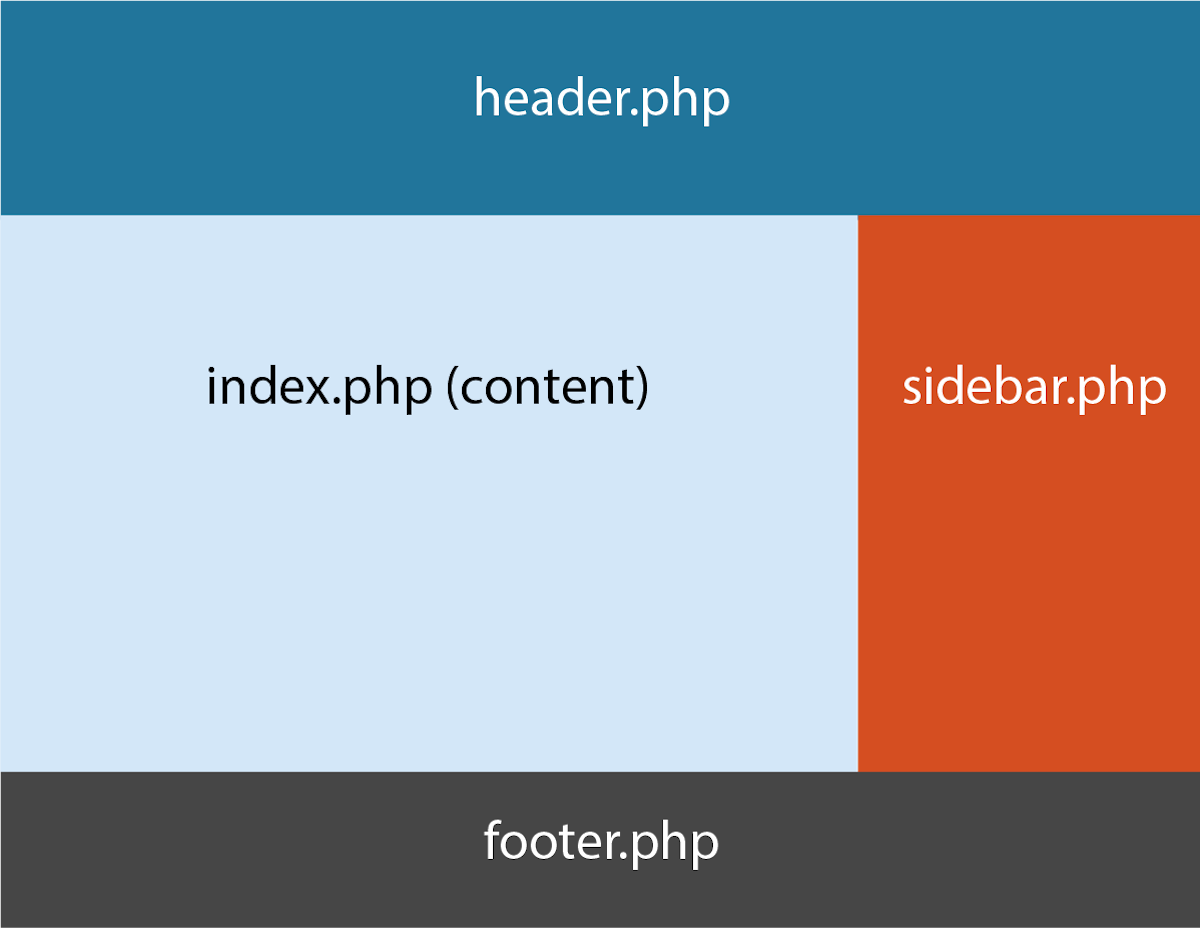
These files (and their corresponding blocks) can be moved around, replaced with other files, have additional files added, or can be removed entirely. For example, an alternative way to arrange the blocks would be:
So how does WordPress do this? It starts with the URL. Your web browser knows that when you type in www.wordpress.org you’re really asking to go to https://www.wordpress.org/index.php. All web browsers have default files they look for at a web address, and in the case of a WordPress site, that default will be the index.php file. So now that WordPress has located the index.php file, this is what the code in the world’s simplest index.php file looks like:
<?php
   get_header();
   get_sidebar();
      if ( have_posts() ) :
         while ( have_posts() ) :
            the_post();
               the_content();
         endwhile;
      endif;
   get_footer();
?>
Notice that it calls the header (header.php), then it calls the sidebar (sidebar.php), then it runs the loop and grabs the content, and finally adds the footer (footer.php).
Many themes include much more than these bare minimum files, such as additional stylesheets and JavaScript files. With larger themes, it’s a good idea to keep files organized using folders. The recommended folder structure, in this case, should include:
/css/– additional CSS files, such asmobile.css, that the theme uses; NOTE that thestyle.cssfile must remain in the main theme folder/js/– JavaScript files/img/– for images that are embedded in the theme such as icons (different than Media Gallery images found in the uploads folder)/language/– for translation files
So an example of the files and folder that might be found in a very simple theme could look like:

index.phpstyle.css/css/mobile.cssprint.css
/img/facebook.pngtwitter.png
/js/lightbox.jsslider.js
The Files Needed to Make a Theme
There are only two basic files required to make a WordPress theme:
index.phpCreates the blog.style.cssIncludes styling information for the site.
However, most themes include:
header.phpGenerates a page’s first elements such as a header image and top-level menu.footer.phpGenerates a page’s final elements such as widgets and menus.sidebar.phpGenerates a page’s sidebar usually including widgetized areas.functions.phpAdds features and functions to your site. Works like a WordPress plugin.screenshot.pngGraphic thumbnail image representing the theme.
And should also include:
single.phpGenerates a blog post.page.phpGenerates a static page.archive.phpGenerates a page displaying posts by date published.category.phpGenerates a page displaying posts by category.tag.phpGenerates a page displaying posts by tag.comments.phpGenerates a page displaying posts by comments.
And don’t forget:
404.phpGenerates a page when a page or post does not exist.search.phpGenerates a page displaying search results.front-page.phpUsed in Settings > Reading to set a static page or the blog as the home page.
That’s a lot of PHP files! So how does WordPress know which file to use? That’s where the WordPress Template Hierarchy comes in.
Lesson Wrap Up
Follow with exercises and assessment outlined above.